You asked AI to help you write an email to a client. It came back polished, professional, thorough — and sounding nothing like you. Too formal. Too wordy. Words you'd never actually say out loud. You edited most of it anyway and wondered if this thing is actually saving you time or just giving you a first draft you have to fix.
This is one of the most common frustrations people have with AI tools, and almost no one talks about why it happens or what to do about it. The fix is simpler than you'd think — it just requires knowing what to ask for.
First, a quick explainer
Two things are working against you. The first is the memory problem: every new AI chat session starts completely blank. It has no idea who you are, how you write, or what you asked it to do last week. (If that's news to you, this post covers the basics.) The second problem is that when AI doesn't know anything about you, it defaults to a safe, neutral, somewhat formal register — the voice that offends nobody and sounds like everyone. It's the corporate-speak equivalent of beige paint.
The good news: AI is actually very good at adjusting its tone once you tell it what you want. The problem is that most people just describe the task and never describe themselves. That's the gap we're closing here.
Step 1: Build a "this is me" block and save it somewhere handy
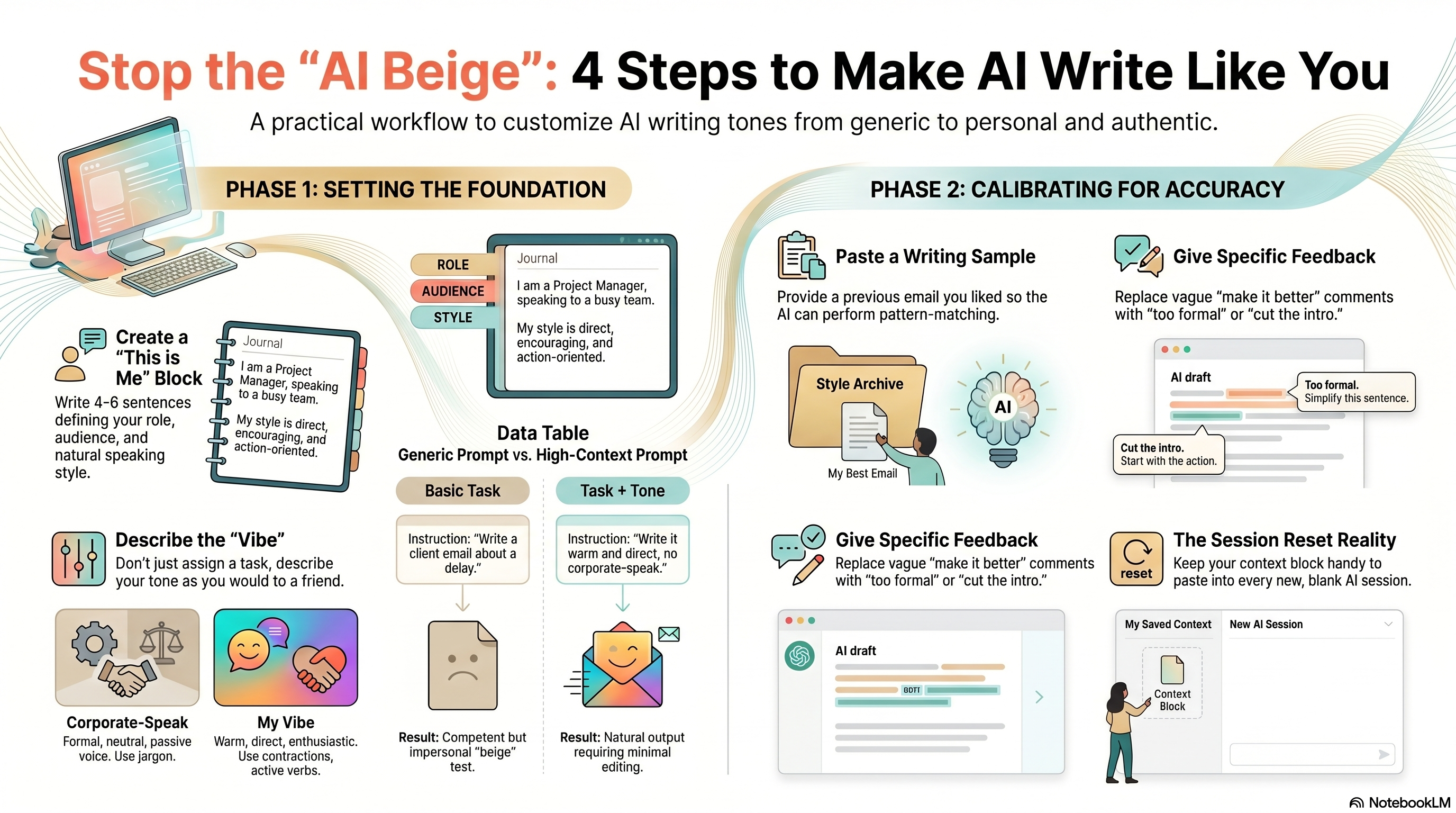
The single most useful thing you can do is write a short personal context block — 4 to 6 sentences — that tells the AI who you are and how you communicate. You paste this at the start of any session where tone matters. Write it once, use it forever.
It doesn't have to be fancy. It just has to be accurate. Think of it as briefing a new assistant before handing them a task. Cover your role, your audience, and how you actually talk to people.
Save that block in a sticky note, a text file on your desktop, or even as a contact note in your phone — anywhere you can get to it in two seconds. When you open a new AI session, paste it before anything else.
Write your context block right now, before you keep reading. Keep it under six sentences. The goal is something you can paste without editing — so be honest rather than aspirational about how you actually write.
Step 2: Tell it how you sound, not just what you want
Most people describe their task but skip describing their voice. "Write me an email to my client about the project delay" gives AI a job to do, but zero information about how you communicate. The result is competent and impersonal.
Add a second layer to your request: tell it the vibe. You don't need fancy terminology — just describe your tone the way you'd describe it to a friend.
With tone direction: Write an email to my client letting them know the project will be delayed two weeks. My style is straight-talking and warm — I'm honest about what happened without making it a big production. No corporate language. Short paragraphs. Something I'd actually send without heavily editing it first.
The second version takes fifteen extra seconds to write. The output you get back will be noticeably closer to something you'd actually send.
Step 3: Paste an example of your own writing
Words like "casual" and "direct" mean different things to different people. The most reliable way to calibrate tone is to show the AI a sample of something you've already written and liked. An email you sent. A message to a colleague. A paragraph from a document you were happy with.
Paste it in and say: "This is how I write. Match this tone and style when you help me." That's it. AI is genuinely good at pattern-matching on writing style — give it something real to work from and it'll get much closer on the first try.
Find an email or message you sent in the last month that felt natural — something you wrote quickly and didn't second-guess. Copy it. That's your style sample. Add it to your context block or paste it separately at the start of sessions where tone is important.
Step 4: Coach it when it drifts, and be specific
Even with good context, AI will sometimes slip back into its default register — especially on longer tasks. When that happens, don't just silently fix it yourself. Tell it what's off. One round of specific feedback usually snaps it back into place and holds for the rest of the session.
Vague feedback doesn't help much. "Make it sound more like me" is hard to act on. Specific feedback works much better.
"I'd never say 'leverage' — just say 'use.'"
"The last paragraph sounds like a press release. Rewrite it like I'm talking to someone I actually know."
"Good overall, but shorten the second paragraph — I wouldn't write anything that long in an email."
Think of it like working with a capable person who doesn't know you well yet. They're not getting it wrong on purpose — they just need a few corrections to understand what you're after. Give them that feedback and the next draft will be better.
A quick reality check
None of this is permanent. When you close the session and open a new one, the AI has forgotten all of it — your context block, your style sample, the corrections you made. You're starting from scratch again. That's just how it works right now. The workaround is having your context block in a place where pasting it takes five seconds, not five minutes. Tools like Claude's Projects feature or ChatGPT's Memory setting can help carry some of this forward automatically, but they're not a replacement for being deliberate about context at the start of a session. Also worth knowing: AI can get your tone close, but it can't replicate you perfectly. The goal isn't outputs you can publish without looking at them — it's outputs that need light editing instead of a full rewrite. That's still a significant improvement over starting from nothing.
Your move
Write your context block. Seriously, right now — open a notes app and spend three minutes on it. Who are you, who do you write to, and how do you actually communicate? Save it somewhere you'll find it. Then next time you open an AI chat for anything involving writing, paste it before you ask your question. Compare the output to what you've been getting. You'll notice the difference immediately.